
A reliable disk copying program for Mac
SuperDuper! is a backup and recovery program designed for macOS computers. It lets users create a bootable backup and secure all the data stored on their computers. With functionalities like a built-in backup scheduler and drive duplicator, SuperDuper for Mac can come in quite handy in case of a system crash that wipes all the files, folders, and apps from your computer.
Top Recommended Alternative

With the help of SuperDuper download, you can create carbon copies of documents, image files, music, and other content stored on your computer’s hard disk. In case of a system wipe, you can restore everything from the app’s intuitive interface. SuperDuper alternatives like Free Mac Data Recovery, Mac Free Any Data Recovery, Clonezilla, and Mac Data Recovery also offer similar features.
What does SuperDuper do?
SuperDuper is a beginner-friendly disk copying program that you can download on your macOS computer. It lets users back up their drivers, so that in the event of a system crash, all the files, folders, and programs can easily be restored. Unfortunately, the software only works on internal drives and doesn’t back up data stored on USBs, CDs, and other external drives.
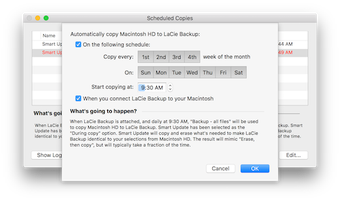
Nevertheless, a simple hack for this is to copy all the contents on your hard drive, and SuberDuper download will automatically create a backup. In terms of creating automatic backups, the software comes with a scheduler that you can use to create a copy of all your latest files every few hours. Alternatively, you can set a date and time to update the backup created using SuperDuper.
Does SuperDuper have a simple interface?
One of the best things about downloading SuperDuper is that it offers a clean and simple interface that is suitable for beginners. In other words, users who aren’t very tech-savvy can easily use SuperDuper to create a backup of all the files stored on their macOS computer. In addition to this, all the features available on the app come with a little description that explains their purpose.
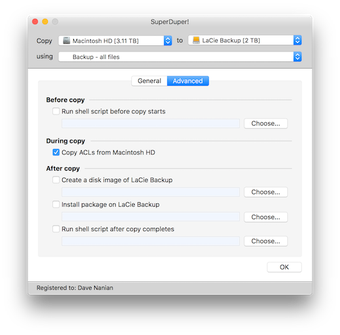
For users who are more experienced with disk copying programs, SuperDuper Mac offers additional functionalities. It provides custom scripts that they can run to create backups and restore files and folders. Moreover, it lets users maintain multiple versions of an operating system across different drives. SuperDuper for Mac also comes with a comprehensive user guide and has an active online community.
What are the features of SuperDuper?
Once you complete SuperDuper download, it creates a backup of your files, applications, and operating system, so that in the event of a system failure, you don’t end up losing them. It does this with its three primary functions - Smart Wake, Smart Update, and Smart Delete.
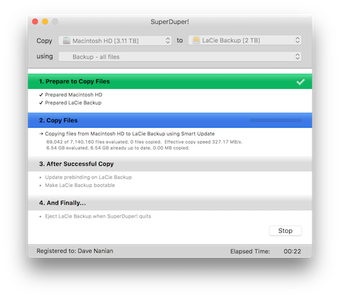
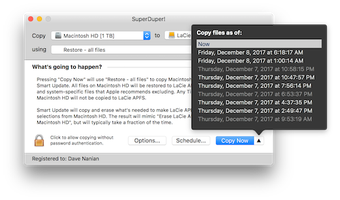
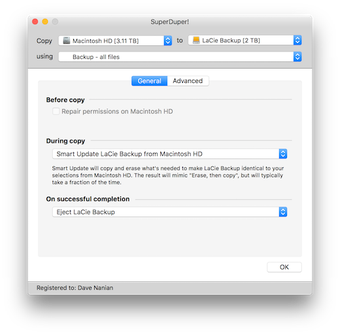
After you create a backup, the Smart Update function automatically updates the backup with the latest files and applications. In case you want to update the backup file at a certain date and time, you can use the Smart Wake tool. Smart Delete gets rid of any duplicates that may appear.
When it comes to creating copies of your drive, SuperDuper features a sandbox backup option that lets you create a partition of your hard drive. You can use this partition to save a bootable version of your computer’s drives, applications, and system updates. The sandbox backup creates a limited-resource environment that’s useful for testing new apps and updating the operating system.
While SuperDuper isn’t very fast, it does create full backups of all files stored on your macOS computer, irrespective of their format. Thanks to this feature, you can easily create a clone of your boot drive and save it on another hard disk drive, image files, or partition. The program’s only drawback is that it doesn’t copy files from external drives, such as USBs, portable hard disks, CDs, and DVDs.
Nevertheless, the application is quite user-friendly and lets users of all levels create and restore backups. Its intuitive interface comes with a Finder function via which you can locate any file or backup and then restore it to its original location. The app also lets users schedule backups and put the computer to sleep after it’s done.
How do you use SuperDuper?
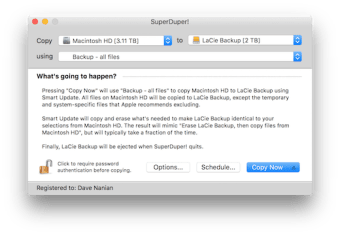
When you first launch SuperDuper download, you’ll be able to see a clean interface with a central drop-down menu. Clicking on it will reveal different options like Copy and Erase, New Files Copy, Update, and more. You can also select the Smart Update icon to update the backup file with all the latest data.
Shirt Pocket, the developer of SuperDuper, designed the program in such a way that beginners find it easy to create and restore backups. For this, they kept the design of the application simple and minimalistic. Furthermore, they included bits of information explaining the purpose of each available function. The company also provides customer support via email and online forums.
Is SuperDuper for Mac free?
While SuperDuper isn’t available for free, it does offer a free trial period. Considering that it is one of the only recovery applications that can exclusively copy macOS and Apple file systems, it is worth the investment. Moreover, the app also provides users with a range of features in an organized interface.
Should I download SuperDuper?
If you’re looking for an application that can copy macOS files, folders, and applications, download SuperDuper. Not only is the app suitable for beginners, but it also provides users with a range of features like a backup scheduler, disk copier, and sandbox backup creator. With the help of this app, you can create a boot drive and save copies of all your files and folders.




.png)










.webp)